Urban Shift: Housing & Rental Trends Visualizer
Teammates E-Portfolios:
https://seth-long.quarto.pub/seth-long
https://drakewolfenden.quarto.pub/drake-wolfendens-website/
When I first learned about the final project for my Computing Methods class, I immediately thought about how confusing housing market data can be for the average person. The datasets are large, spread across many years, and often feel overwhelming to look at. My team wanted to build something that made this data easy to explore and understand. The idea behind Urban Shift was to take raw housing and rental price information and turn it into clean visual tools that anyone could use.
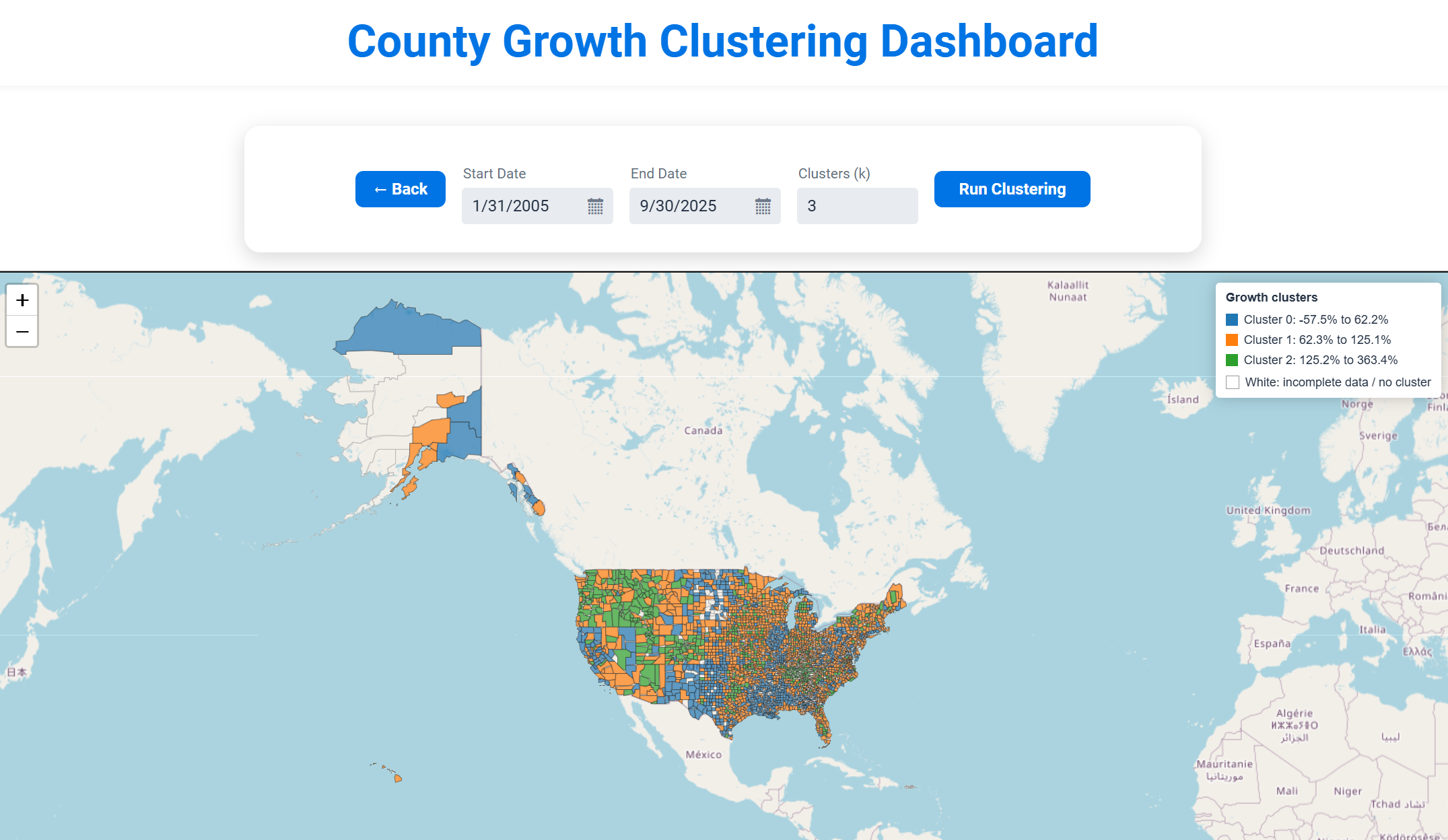
Urban Shift became a web-based application where users can explore long-term housing and rental trends for U.S. counties. The website allows users to select a state and county, pick a date range, and instantly view a line chart that reflects how prices have changed over time. It also includes an interactive national map that groups counties into clusters based on growth behavior. The goal was to create something helpful for students, researchers, or anyone curious about regional housing markets. In the end, the project grew into a tool that highlights patterns and differences across the country in a way that simple spreadsheets cannot.
Implementations and Methods
The system uses a pipeline that cleans, reshapes, and analyzes raw Zillow datasets. We used Tablesaw to process the CSV files and to convert wide time-series data into usable columns. A key part of the backend is the feature builder that computes percent change, average monthly change, and volatility for each county. This was essential for clustering.
double pctChange = (endVal - startVal) / startVal * 100.0;
double months = series.size() - 1;
double avgMonthly = pctChange / months;
List<Double> momChanges = new ArrayList<>();
for (int i = 1; i < series.size(); i++) {
double prev = series.get(i - 1);
double curr = series.get(i);
double change = (curr - prev) / prev * 100.0;
momChanges.add(change);
}
double volatility = computeStdDev(momChanges);
This snippet demonstrates how the system calculates the key statistics used for machine learning. Each county is transformed into a compact numerical representation that allows K-means clustering to group them.
For the clustering itself, we used the SMILE library to cluster counties based on their percent growth. This allowed us to group counties into categories such as low growth, medium growth, and high growth.
double[][] X = featureList.toArray(new double[0][]);
KMeans kmeans = KMeans.fit(X, kUsed);
int[] labels = kmeans.y;
This simple call to SMILE hides a lot of backend preparation, including data cleaning, feature standardization, missing value handling, and the construction of FIPS codes that match counties in the GeoJSON map.
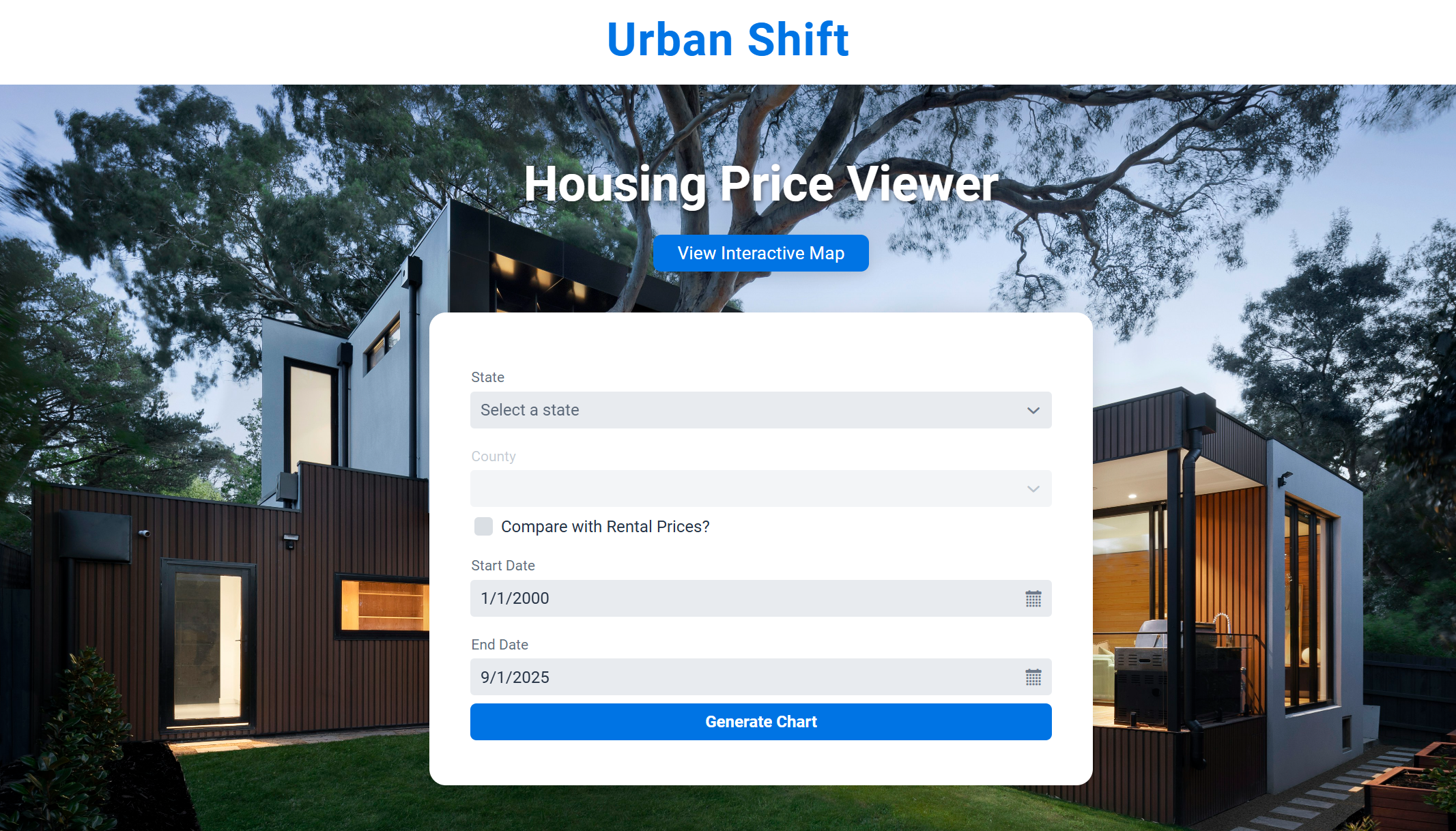
My main responsibilities were on the frontend. I used Vaadin to build the interface and designed the layouts that users interact with. This included menus for selecting states, date pickers, checkboxes for rental price comparison, and navigation between pages. I also built the chart section that displays the time-series data.
One of the most challenging parts was connecting Vaadin to a custom Leaflet map. I needed to send JSON from Java into JavaScript so the map could color each county based on its cluster. This required coordinating: Java and Vaadin.
getElement().executeJs(
"window.setCountyClusters($0, JSON.parse($1), JSON.parse($2), JSON.parse($3));",
"county-map",
result.geoJson(),
mapper.writeValueAsString(result.clustersByFips()),
mapper.writeValueAsString(result.stats())
);
This code triggers the JavaScript function that updates the Leaflet map with new cluster colors. Getting this working required careful coordination between data formats, timing, and DOM updates.
I also created the homepage interface, which included dropdown menus, dynamic date pickers, and a button to generate the charts. The code below shows part of the UI assembly.
ComboBox<String> stateComboBox = new ComboBox<>("State");
ComboBox<String> countyComboBox = new ComboBox<>("County");
DatePicker startDatePicker = new DatePicker("Start Date");
DatePicker endDatePicker = new DatePicker("End Date");
Button submitButton = new Button("Generate Chart");
submitButton.addClickListener(e -> buildChart());
While simple, this snippet shows how I structured user interaction and connected it to the backend data loader.
Key Decisions and Challenges
During development, we made several important decisions based on problems we experienced along the way. One issue involved how to display counties on the map. We initially tried point markers, but they became crowded and difficult to read. We switched to county polygons because they provided a clearer representation.
Another major challenge came from inconsistent date formats in the dataset. To prevent errors, we built a flexible date parser that accepted multiple formats.
if (s.matches("\\d{1,2}/\\d{4}")) {
int m = Integer.parseInt(p[0]);
int y = Integer.parseInt(p[1]);
return LocalDate.of(y, m, 1);
}
We also faced issues matching FIPS codes between the housing dataset and the county map. The formats were not consistent, so we had to standardize everything.
return String.format("%02d%03d", state, county);
Finally, we worried about performance. Rendering thousands of shapes on the client can be slow, so we moved all heavy computations to the backend.
What I Learned and How I Grew
When we first started working on this project, I only had basic experience with Vaadin. I had built simple interfaces before and connected them to Java, but nothing close to the size or complexity of Urban Shift. This project forced me to step up. I had to design a real interface that looked good, connect it to custom JavaScript for the map, and figure out how to move data around without breaking everything. It was definitely a learning curve, but by the time we finished, I felt a lot more confident with frontend work, especially when it came to layout design, handling user actions, and figuring out bugs.
I also learned a lot about working as part of a team. Everyone had their own piece of the project, which meant we had to constantly check in with each other so our code actually worked together. Even small changes could mess things up for someone else, so communication became a huge part of the process. It pushed me to write cleaner code, stay organized, and keep our project structure consistent so we didn’t create unnecessary problems.
What surprised me the most was how much I ended up appreciating data visualization. Looking at the raw housing data in a spreadsheet doesn’t tell you much, but once you put it into a chart or map, the trends basically jump out at you. This project helped me see how important good presentation is and how much of a difference it makes when turning complicated information into something people can actually understand. After working on Urban Shift, I feel way more confident about building interactive tools that mix data, design, and programming.
Future Improvements
If I continue working on Urban Shift, I would like to add tooltips on the map for showing exact growth statistics when users click a county. I would also like to add export features so users can download the charts or CSV data. Another improvement would be giving users more control over the clustering settings, such as selecting different distance metrics or trying other clustering methods. These additions could make the tool even more helpful and interactive.